
Former BFans Poster? Make Your Presence Known Here

41,428 Views | 322 Replies | Last: 8 yr ago by Pecos 45
BU84BEAR
How long do you want to ignore this user?
bad doublewide (______|_______) ?

is there an emoji for that?
AstroCowboy
How long do you want to ignore this user?
Ready to SIc 'em
BU84BEAR
How long do you want to ignore this user?
Welcome
Brian Ethridge
How long do you want to ignore this user?
BU84BEAR said:

Welcome guys. Glad you made the leap. Now go start a thread or post in one you are interested in so we can awaken the dead!!!

It will attract posters already here as well as people just making the transition. Activity attracts activity.

Suggestions

: Baylor limericks??? (may be a BAD idea)
Favorite Baylor GIFS
Favorite Baylor Plays on Video
Fight Song Discussion
Dorm Pranks at Baylor
Intramural Glory
Baylor Dating Fail
Today's recruiting news
NoZe Bros talk
BOR Grievances in the BOR Grievances thread (Lord help us)

Join in on the existing threads. lets get this party started.

New people, let us know you have arrived.

Our tech team will be moving the history over in the next two weeks so these long running threads will be here for everyone to enjoy.
BU84BEAR
How long do you want to ignore this user?
Brian Ethridge said:

BU84BEAR said:

Welcome guys. Glad you made the leap. Now go start a thread or post in one you are interested in so we can awaken the dead!!!

It will attract posters already here as well as people just making the transition. Activity attracts activity.

Suggestions

: Baylor limericks??? (may be a BAD idea)
Favorite Baylor GIFS
Favorite Baylor Plays on Video
Fight Song Discussion
Dorm Pranks at Baylor
Intramural Glory
Baylor Dating Fail
Today's recruiting news
NoZe Bros talk
BOR Grievances in the BOR Grievances thread (Lord help us)

Join in on the existing threads. lets get this party started.

New people, let us know you have arrived.

Our tech team will be moving the history over in the next two weeks so these long running threads will be here for everyone to enjoy.
Is it true that if we necropost in a really old classic thread that it will or could come over? For example I hate to lose the fight song history (due to the amount of research and knowledge that went into it) or the Baseball Fact of The Day thread which is viewed by about 30-40 a day and has a years worth of interesting baseball facts and trivia and history found over a year. I'd also hate to lose the Random Stadium Updates Thread with all the pictures of the stadium being built.
BU84BEAR
How long do you want to ignore this user?
Also, is there a way to go to the last post on a thread instead of the first when you click on it? Or maybe after you click on it a second time? I'm wasting a lot of clicks getting to the last post when someone replies
Brian Ethridge
How long do you want to ignore this user?
BU84BEAR said:

Brian Ethridge said:

BU84BEAR said:

Welcome guys. Glad you made the leap. Now go start a thread or post in one you are interested in so we can awaken the dead!!!

It will attract posters already here as well as people just making the transition. Activity attracts activity.

Suggestions

: Baylor limericks??? (may be a BAD idea)
Favorite Baylor GIFS
Favorite Baylor Plays on Video
Fight Song Discussion
Dorm Pranks at Baylor
Intramural Glory
Baylor Dating Fail
Today's recruiting news
NoZe Bros talk
BOR Grievances in the BOR Grievances thread (Lord help us)

Join in on the existing threads. lets get this party started.

New people, let us know you have arrived.

Our tech team will be moving the history over in the next two weeks so these long running threads will be here for everyone to enjoy.
Is it true that if we necropost in a really old classic thread that it will or could come over? For example I hate to lose the fight song history (due to the amount of research and knowledge that went into it) or the Baseball Fact of The Day thread which is viewed by about 30-40 a day and has a years worth of interesting baseball facts and trivia and history found over a year. I'd also hate to lose the Random Stadium Updates Thread with all the pictures of the stadium being built.
We're pulling the first two weeks now, so bump that post.
Brian Ethridge
How long do you want to ignore this user?
BU84BEAR said:

Also, is there a way to go to the last post on a thread instead of the first when you click on it? Or maybe after you click on it a second time? I'm wasting a lot of clicks getting to the last post when someone replies
Yes, click on the number and it will take you to the last post from where you left it. If no new post has been made it will not. It should be a different color if a post has been made after you. If someone quotes you it should be blue to show a reply has been made to you.
william
How long do you want to ignore this user?
marco said:

Pass me a heroin and water, I'm here for the gangbang.
It takes a clear mind,,,,,,,

- Bill

... to. make. it.

arbyscoin - the only crypto you can eat.
GhettoHEBear
How long do you want to ignore this user?
New guy here...been born again and the baptism washed all my posts and rep points away!
Kite23
How long do you want to ignore this user?
We have been reborn with no marks or pains of our former accounts. Glory to the Highest!
boognishbear
How long do you want to ignore this user?
....
boognishbear
How long do you want to ignore this user?
BearTooth said:

Austin360 to Thee Bears' Den to Baylorfans to SicEm365.

Where are the white women at?


Ask Kendal...

boognishbear
How long do you want to ignore this user?
Good to see all the familiar party people

I'm glad we have a replacement for BFans...my wife is not.
Kite23
How long do you want to ignore this user?
Quote:

Ask Kendal...


Brian Ethridge
How long do you want to ignore this user?
boognishbear said:

BearTooth said:

Austin360 to Thee Bears' Den to Baylorfans to SicEm365.

Where are the white women at?


Ask Kendal...
via GIPHY


RightRevBear
How long do you want to ignore this user?
I have switched over from BFans, but I changed my name. No longer shall I be known as Droberts. You will now refer to me as RightRevBear.
BU84BEAR
How long do you want to ignore this user?
Right Rev.... you're wish is our command
OKC Bear
How long do you want to ignore this user?
Formerly baylorRT64, now OKC Bear. Haven't posted much in the past 5 years, but who knows, that may change.
Colt B.
How long do you want to ignore this user?
https://sicem365.com/forums/2/topics/76

Welcome to the forums! We wanted to give you a quick tutorial of how everything works around here so you can get started quickly.

Topics Page
The topics page contains a list of all the topics (or "threads") in a forum. If you'd like to learn the different features of the topics page, take a look at our mobile and desktop diagrams.

Topic (or Thread)
Each thread has its own features. Take a look at our mobile and desktop diagrams if you'd like to learn about those. We'll go into detail about a few of those features below.

Blue Stars
The "Blue Star" works the same way a "Like" does on Facebook or Twitter. Users will Blue Star posts for a variety of reasons - they might agree with the post, think it's funny, etc. Once a post reaches a certain number of Blue Stars (currently set at 3 for this forum), the post itself will turn blue. Also, the post with the most blue stars across the site will be featured as a "Post of the Day" on the POTD page and on the right side of the desktop forums.

Flagging (or Reporting)
Help us keep the forum civil by flagging posts that violate our posting policies - it alerts our moderators to the post so it can be addressed. Our moderators try their best to keep the forums clean of trolls, spam, etc, and flagging really helps them.

Posting a photo or GIF
You can post a photo two different ways:
1. On desktop, click the photo icon, paste in the URL and click "Insert". A thumbnail will display immediately and will change to full size once you click "post".
2. On desktop or mobile, simply paste the photo URL into the text field. The photo will display once you click "post".

Note: We don't allow photos to be uploaded into our system - it must already exist somewhere on the Internet.

Viewing a photo or GIF on mobile
On mobile, the default setting is to display an icon that you must tap in order to display the full photo (see the icon below if you're on the mobile site). This helps you avoid wasting cell data from downloading large photos. You can choose which you prefer: if you want photos to render automatically on mobile, tap the menu button, then "more," then turn on "Auto-load images".

On desktop, photos and GIFs will display automatically; however, if the photo is really large, you can click it to zoom in. Click the photo below to try it (and click again to close):


Embedding social media
Embedding tweets, photos and videos is simple: just paste the URL into your post, and it will automatically display once you click "post" (like the example below). You can currently embed from Twitter, Instagram, Vine, YouTube and Hudl.


The Watchlist
If you've made a post on the site, you may have noticed a blue notification at the top right side of your page. If not, just look for the binoculars icon. That's your Watchlist. Its main purpose is to help you keep track of conversations across the forums. It's pretty simple: if someone posts a new reply into any thread that's in your Watchlist, you'll get a notification. Just roll over or tap the blue icon to see how many new replies there are and click that number to be taken to the first unread reply.

There are three ways to add a thread to your Watchlist...
1. Every thread you start is automatically added
2. Every thread you post on is automatically added
3. You can click "Watch Topic" (desktop) or the Binoculars icon (mobile) at the top of the thread

There are four ways to remove a thread from your Watchlist...
1. Click the "X" icon on the left side of the Watchlist drop-down
2. Click the "X" icon on the right side of the full Watchlist page
3. Click the "Stop Watching" or the Binoculars icon (mobile) at the top of the thread
4. Once a thread has gone 30 days without a new reply, it's automatically removed

Formatting a post
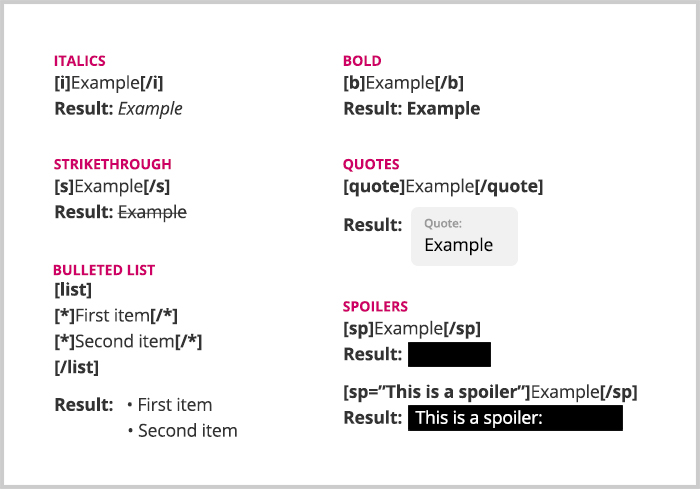
Our desktop site allows you to format text (bold, italics, etc.) within the text field when writing a post; however, our mobile site requires forum code.

Here's a quick mobile forum code reference guide:


Tech Support & Questions
If you have any questions, problems, notice any bugs, etc. please post a new thread in our Technical Support forum and we'll be glad to help.
BearInBigD
How long do you want to ignore this user?
Back at you Ghetto....strange being a newbie around here.

I was a little slow getting over here and was surprised (but glad) to see cowboycwr beat me.

Well, here we go...no turning back
Bear8084
How long do you want to ignore this user?
Bear8084 reporting in!!!! Not too bad, I think this is gonna be pretty cool. Sic 'Em!!!!
geoman
How long do you want to ignore this user?
geoman's in, perusing this fine place like a first-time tourist to NYC.
Beaneater
How long do you want to ignore this user?
Brian Ethridge said:

BU84BEAR said:

Also, is there a way to go to the last post on a thread instead of the first when you click on it? Or maybe after you click on it a second time? I'm wasting a lot of clicks getting to the last post when someone replies
Yes, click on the number and it will take you to the last post from where you left it. If no new post has been made it will not. It should be a different color if a post has been made after you. If someone quotes you it should be blue to show a reply has been made to you.
OK I'm here. Not real happy about it but that doesn't change anything.
So far that 'click on the number' thing is not working, just takes me to the 1st post in the thread.

BU84BEAR
How long do you want to ignore this user?
I don't think it works on the watchlist but it does work on the forum list if you click on the unread threads number.

Edit: Well, just now when I tried it it worked twice in a row on the watchlist. It is either the other way around or we need to be careful where we click.
BU84BEAR
How long do you want to ignore this user?
For troll identification purposes:

These symbols designate a person's posting status and are related to the number of posts which they have made on SicEm365.

Rookie: 0-29 posts
Pro: 30-99 posts
Veteran: 100-999 posts
All Star: 1,000-3,999 posts
Hall of Famer: 4,000-7,999 posts
SicEm365 Legend: 8,000+ posts

I have already been promoted to the Pro level.
Codeman21
How long do you want to ignore this user?
Have made the move over from Baylorfans.com I wasn't a everyday or every week poster but I enjoyed checking in from time to time. Here is to a great season with Coach Rhule.
utbear
How long do you want to ignore this user?
I made the jump.
I don't post much, but I enjoy reading what the "young" folks have to say.
Graduated from UT in 70, but became ardent Baylor fan after my youngest son and his wife graduated from there.
BU84BEAR
How long do you want to ignore this user?
Welcome to both of you.
Brian Ethridge
How long do you want to ignore this user?
Beaneter said:

Brian Ethridge said:

BU84BEAR said:

Also, is there a way to go to the last post on a thread instead of the first when you click on it? Or maybe after you click on it a second time? I'm wasting a lot of clicks getting to the last post when someone replies
Yes, click on the number and it will take you to the last post from where you left it. If no new post has been made it will not. It should be a different color if a post has been made after you. If someone quotes you it should be blue to show a reply has been made to you.
OK I'm here. Not real happy about it but that doesn't change anything.
So far that 'click on the number' thing is not working, just takes me to the 1st post in the thread.

That would mean the thread hasn't had a new post since you last read.

The new posts are just to the left of the total posts. Click on the new posts and it should take you there.

Sorry for the confusion.
SchuBear
How long do you want to ignore this user?
Same me. Same lurker status. Now back to the shadows.

BU84BEAR
How long do you want to ignore this user?
LOL< welcome lurkers too!!
Joe to Bonner
How long do you want to ignore this user?
Ok, I'm finally here, so we can get back to the important business at hand.

Question - what poster on this board is BEAR?

Also What are the plans for Tapatalk support?
Fozzie
How long do you want to ignore this user?
Welcome Baylorfans.comers. You will love SicEm365. Great info and community. But it will be made stronger by this merger.
Stranger
How long do you want to ignore this user?
Joe to Bonner said:

Ok, I'm finally here, so we can get back to the important business at hand.

Question - what poster on this board is BEAR?

Also What are the plans for Tapatalk support?
BEAR is like Santa Claus. He's everywhere.

The real question is why is Tommye Lou still employed at Baylor?
I'm a Bearbacker
 
×
subscribe Verify your student status
See Subscription Benefits
Trial only available to users who have never subscribed or participated in a previous trial.